
PowerShell Universal API with [APIEndpoint()]
I am always trying to make automation easier to scale in real teams. Recently I
built a small module,
synedgy.universal.helper,
to simplify how I define and import PowerShell Universal API endpoints.
The key idea is to keep endpoint metadata close to the PowerShell function it belongs to, instead of duplicating definitions in separate files.
![Custom [APIEndpoint()] illustration for this post](/_astro/apiendpoint-cover.BOf3tKrK_tO0li.webp)
PowerShell Universal API in practice
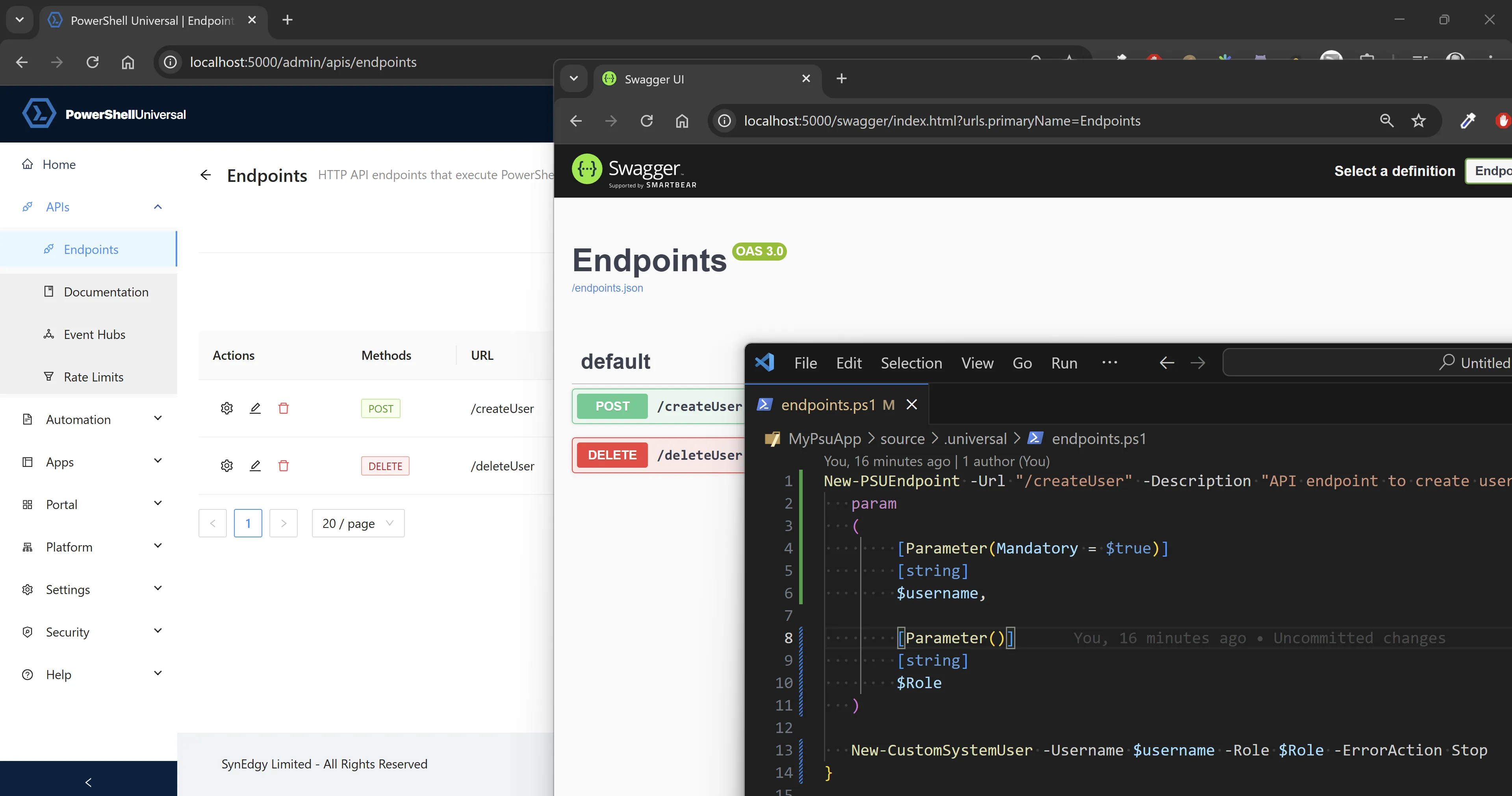
PowerShell Universal can expose REST APIs directly from PowerShell and generate Swagger/OpenAPI documentation from your endpoint definitions.
The documented endpoint patterns are:
- Pass a
-ScriptBlockdirectly toNew-PSUApiEndpoint(fast for prototypes) - Use module and command bindings for cleaner long-term structure
Both work, but if an API grows, endpoint sprawl in endpoints.ps1 quickly
becomes difficult to maintain.
Production tips before custom patterns
Two habits help early:
- Keep endpoint logic inside PowerShell modules, not large inline scriptblocks
- Run APIs in dedicated PowerShell Universal environments
Environment isolation improves startup and operational control because modules can be preloaded and API workloads can be restarted independently.
$newPSUEnvironmentParams = @{
    Name                     = 'PSUModuleEnv'
    Variables                = @('*')
    Description              = 'Environment for PSUModule API'
    Type                     = 'PowerShell7'
    Path                     = 'pwsh'
    Arguments                = '-NoLogo'
    Modules                  = @('PSUModule')
    DisableImplicitWinCompat = $true
    PSModulePath             = (Split-Path -Path $PSScriptRoot -Parent)
    PersistentRunspace       = $true
}

New-PSUEnvironment @newPSUEnvironmentParams
Where the usual endpoint model gets awkward
I found three recurring friction points:
- Parameter casing mismatch: PowerShell uses PascalCase while many API consumers expect camelCase.
- Split ownership: function logic sits in one file while endpoint metadata sits elsewhere.
- Bulk environment changes: moving endpoints between environments can become repetitive search-and-replace work.
The [APIEndpoint()] attribute pattern
The pattern is to annotate the function itself with endpoint metadata:
function Get-Something {
    [CmdletBinding()]
    [ApiEndpoint(
        Path = '/getSomething',
        Method = @('GET'),
        Description = 'Get a string using the someThing parameter.',
        Environment = 'PowerShell 7',
        ContentType = 'text/event-stream; charset=utf-8'
    )]
    param (
        [Parameter()]
        [string]
        $SomeThing
    )

    Get-ResultFromSomewhere -SomeThing $SomeThing
}
Then import all attributed endpoints from the module:
# .universal/endpoints.ps1
# Assumes synedgy.universal.helper is available in PSModulePath.
Import-PSUEndpoint -Module PSUModule -Environment PSUModuleEnv
This gives one place for endpoint intent and function implementation.
What Import-PSUEndpoint does
Import-PSUEndpoint discovers exported functions with [APIEndpoint()] where
IsEndpoint = $true, then generates endpoint scriptblocks that:
- Mirror the function signature
- Expose API-facing parameters in camelCase
- Splat
@PSBoundParametersback to the original function
Example generated shape:
{
    [CmdletBinding()]
    param (
        [Parameter()]
        [string]
        $someThing
    )

    Get-Something @PSBoundParameters
}
How the custom attribute is defined
The attribute is a normal PowerShell class inheriting from
System.Attribute.
class APIEndpoint : System.Attribute {
    [bool]$IsEndpoint = $true
    [string]$Name
    [string]$Version = 'v1'
    [string]$Path
    [string]$Description
    [ValidateSet('GET', 'POST', 'PUT', 'DELETE', 'PATCH', 'HEAD')]
    [string[]]$Method
    [bool]$Authentication = $false
    [string[]]$Role
    [string]$Tag
    [int]$Timeout
    [string]$Environment
    [string]$ContentType = 'application/json; charset=utf-8'
    [ValidateSet('Information', 'Warning', 'Error', 'Verbose', 'Debug')]
    [string[]]$LogLevel = @('Information')
    [scriptblock]$Parameters

    APIEndpoint () {}
}
A simple discovery pass looks like this:
Get-Command -Module PSUModule | Where-Object {
    $_.ScriptBlock.Attributes.Where{
        $_.TypeId.ToString() -eq 'APIEndpoint' -and
        $_.IsEndpoint -eq $true
    }
}
Dependency and reuse
To reuse the attribute across modules, expose it via type accelerators as
described in
PowerShell Modules Exporting classes,
then declare synedgy.universal.helper as a required module.
Limitations and future evolutions
Two areas remain important:
- Thread/module loading and file locks: importing modules on the main PSU thread can keep DLL handles alive longer than desired during deployment.
- Switch parameter translation: where endpoint handling still struggles with
[switch], generated signatures can translate to[bool]before splatting.