


Build a structured foundation for using PowerShell confidently in operational work.
This course moves progressively from command discovery and syntax through reusable scripting practices. Practical exercises use real system interactions so participants can connect each concept to day-to-day administration.
Who this course is for
The course is designed for IT professionals and system administrators who want to move beyond one-off commands and develop reliable scripting habits.
No formal PowerShell prerequisite is required. Basic confidence using a command-line interface is useful.
Use the PowerShell skills framework to self-assess before choosing a course.
What participants will learn
- Discover commands and use PowerShell help effectively
- Understand PowerShell syntax, objects, and the pipeline
- Work with variables, collections, conditions, and loops
- Interact with systems and common administrative interfaces
- Turn repeated tasks into readable, maintainable scripts
- Handle errors and make scripts safer to operate
- Organise code for reuse and future module development
Practical learning
Exercises run throughout the course. Participants progressively build scripts for realistic administration scenarios and consolidate their learning in a final practical project.
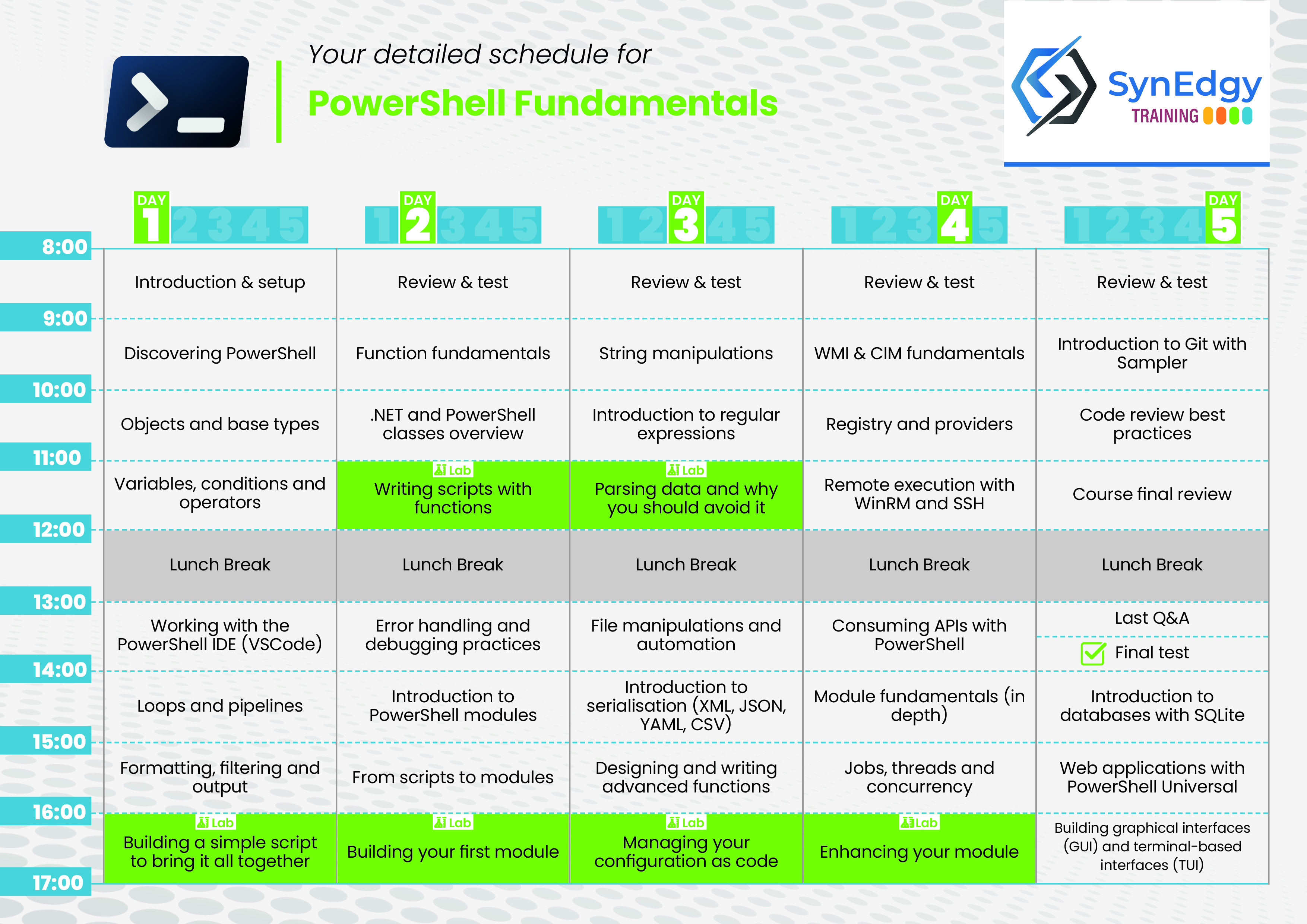
Training programme
Day 1: PowerShell foundations
- Discover the PowerShell environment, command line, editor, and help system
- Understand cmdlets, pipelines, and the object model
- Use variables, expressions, and common data types
- Practise command discovery and syntax exploration
Day 2: Scripting core concepts
- Write and structure scripts with functions and parameters
- Control execution with conditions and loops
- Handle errors with structured techniques and clear exit behaviour
- Apply readable scripting conventions
Day 3: System interaction and data
- Interact with files, folders, services, and scheduled tasks
- Filter, group, sort, and present objects
- Import and export CSV, JSON, YAML, and XML data
- Create custom objects and use hash tables for structured data
Day 4: Automation and reuse
- Automate work with remoting and background jobs
- Use and create PowerShell modules
- Handle credentials and sensitive input safely
- Add logging and design maintainable automation scripts
Day 5: Practices and final project
- Review naming, structure, and modular design
- Introduce source control and versioning principles
- Complete and present a practical automation project
- Identify next steps across PowerShell Universal, DSC, and delivery pipelines
Delivery
This is private company training delivered in English or French, subject to instructor and scheduling availability. Delivery can be remote or in person, with exercises adapted to the audience where appropriate.
The course is practical professional development, not an accredited or vendor-authorised certification.