PowerShell Universal API with [APIEndpoint()]
I’m always working on making automation successful, and I recently built a new module that makes it easier to create APIs. Introducing synedgy.universal.helper to help with building PowerShell Universal API.
No need to be an advanced PowerShell author to use this!
The module exposes the Type Accelerator [APIEndpoint()], using PowerShell Modules Exporting classes from my last post. With that attribute, I can define my endpoint where I define its function, from within the module.
Let’s dive in!
PowerShell Universal API
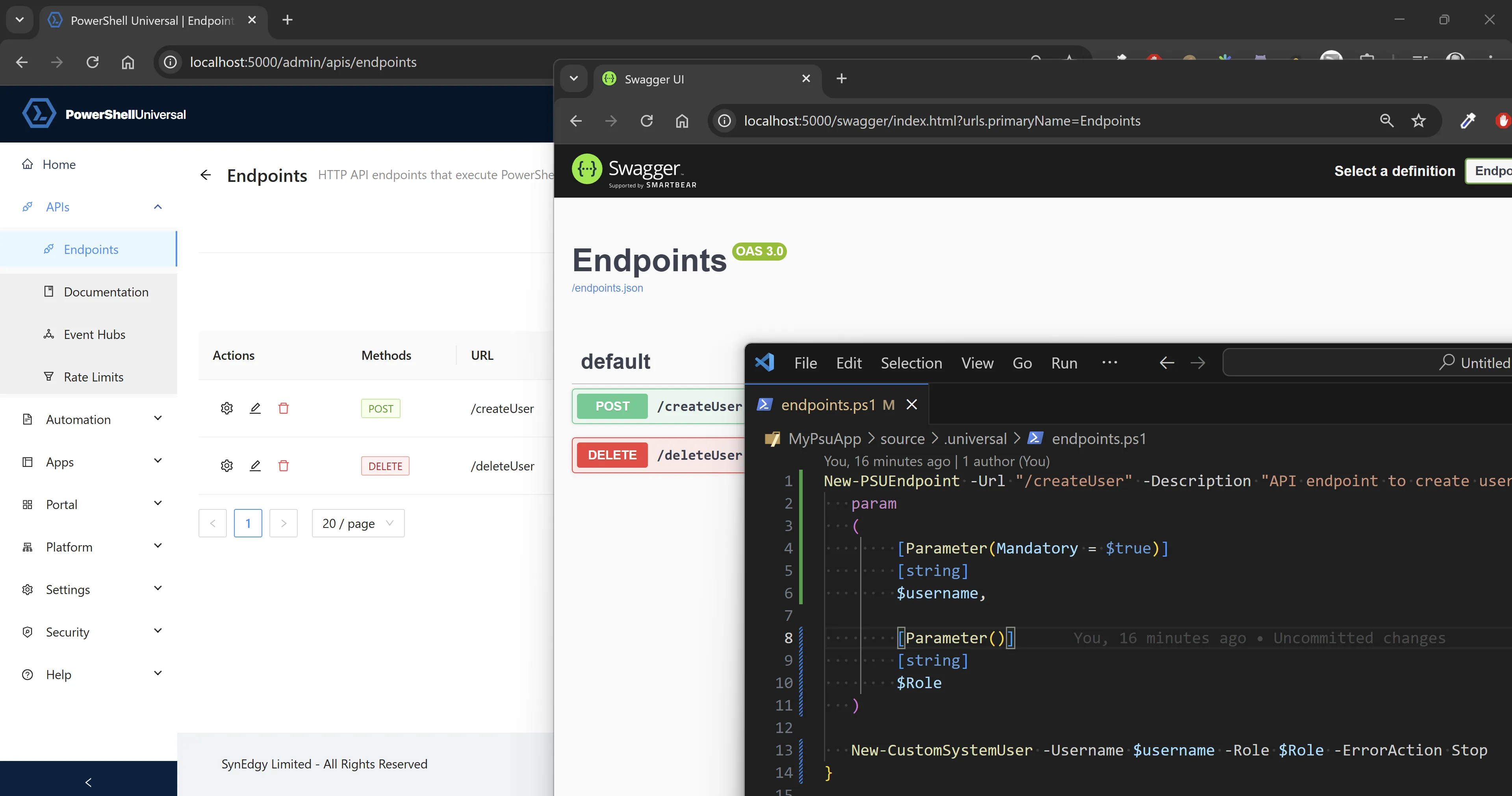
PowerShell Universal is great to build your REST APIs directly from PowerShell, and have it generate the associated swagger (OAS). To do so, you can create each endpoint using the New-PSUApiEndpoint cmdlet.

The screenshot above shows a PowerShell Universal API (check our courses) written in PowerShell, and the result in the admin interface.
The documented ways
You have mainly two ways to use it:
- Specifying the ScriptBlock that will be running that command (legacy).
- Specifying the Module and Command to be run when the API endpoint is invoked (New-ish, in v5 iirc).
In both case you can specify further information: the URL for that endpoint, the method, and so on. Check New-PSUApiEndpoint‘s help for more details.
Production Tips
I often see newcomers to PowerShell Universal using the New-PSUApiEndpoint cmdlet with the -ScriptBlock parameter… While it’s great for testing, this approach does not scale, your endpoints.ps1 will quickly get messy and hard to manage! Keep the endpoints defined in PowerShell modules, where the rest of logic is defined.
I also find that running your APIs in specific Environments greatly improves performance, and management.
Environments in PowerShell Universal
Environments enables you to preload modules and run a setup script in a session, so that each thread used thereafter to answer the REST calls will have that module pre-loaded, saving time for each response.
Also, when things go wrong, it’s easy to just restart the environment specific to an api. And by isolating APIs to specific environments, you are avoiding conflicts, and making things easier to troubleshoot.
$newPSUEnvironmentParams = @{
Name = 'PSUModuleEnv'
Variables = @('*')
Description = 'Environment for PSUModule API'
Type = 'PowerShell7'
Path = 'pwsh'
Arguments = '-NoLogo'
Modules = @('PSUModule')
DisableImplicitWinCompat = $true
PSModulePath = (Split-Path -Path $PSScriptRoot -Parent)
PersistentRunspace = $true
}
New-PSUEnvironment @newPSUEnvironmentParamsWhen coupled with PowerShell Universal 5, and the way it allows to deploy apps, environments and config via PowerShell modules, it greatly simplifies the resource management and improves the modularity of your PowerShell Universal ecosystem.
Module-defined endpoint
While I definitely think that the endpoints used in a PowerShell Universal API must be PowerShell functions defined in PowerShell modules, I’m not yet convinced that using New-PSUApiEndpoint with the -Module and -Command parameter is always the best approach.
For instance, function parameters ought to be written with PascalCase, but a REST API usually defines parameters in camelCase.
If I define my parameter like this:
[Parameter()]
[string]
$MyStringThe Swagger will show it expects MyString, but the convention (aligning with JS variable naming) would dictate that it should be:
myStringNot a huge difference, but it can be hard to integrate with other services written in Java that are VERY strict about casing…
Another thing I wasn’t pleased with: when I write a function I need to define the information about its corresponding endpoint elsewhere.
Not only I would create a function Get-Something, I also had to add an entry in a .universal/endpoints.ps1 file in my module… And every time I add one function I have to make sure I also define its corresponding endpoints.
Finally, sometimes you define endpoints, but for troubleshooting reasons you want to move them all into another environment… In this case you’d have to search and replace in that endpoints.ps1 file. Tedious.
But there’s a better way.
The [APIEndpoint()] attribute
Since we can build our own custom PowerShell attributes, I thought that I could store all the PSUEndpoint’s required information in an attribute, right where the function is defined, just under the [CmdletBinding()] attribute for instance…
Here’s an example:
function Get-Something
{
[CmdletBinding()]
[ApiEndpoint(
Path = "/get-something",
Method = ('GET'),
Description = "Get some string based on the someThing string parameter.",
Environment = "Agent",
ContentType = 'text/event-stream; charset=utf-8'
)]
param
(
[Parameters()]
[string]
$SomeThing
)
$Something
#...
}Now, how to leverage that metadata!?
Using Import-PSUEndpoint
The module synedgy.universal.helper offers the function Import-PSUEndpoint that takes for argument the module to export public functions implementing the [APIEndpoint()] attribute.
It also takes the Environment and API Prefix as parameters to override the values defined in the [APIEndpoint()] attributes when importing.
In your .universal/endpoints.ps1 you would use the following configuration:
# Assuming synedgy.universal.helper is in one of the path in $Env:PSModulePath
# Most likely in $repository/Modules
Import-PSUEndpoint -Module PSUModule -Environment PSUModuleEnvThis function looks at all the PSUModule‘s exported (Public) functions that have the attribute [APIEndpoint()] defined, and IsEndpoint set to $true.
For each of those discovered endpoint functions, it grabs the param block to generate a [ScriptBlock] with the same signature, but their parameters written in camelCase, and the body only splats the $PSBoundParameters to the module’s function.
Assuming my function Get-Something that would be written like so:
function Get-Something
{
[CmdletBinding()]
param
(
[Parameters()]
[string]
$SomeThing
)
$Something
}I add the [APIEndpoint()] Attribute under the [CmdletBinding()]:
[ApiEndpoint(
Path = "/getSomething",
Method = ('GET'),
Description = "Get some string based on the someThing string parameter.",
Environment = "PowerShell 7", # Available by default in PowerShell Universal 5
ContentType = 'text/event-stream; charset=utf-8'
)]With my endpoint file configured like this:
# .universal/endpoints.ps1
Import-PSUEndpoint -Module PSUModule -Environment PSUModuleEnvThe generated ScriptBlock for my endpoint now looks like that (note the parameter casing):
{
[CmdletBinding()]
param
(
[Parameters()]
[string]
$someThing
)
Get-Something @PSBoundParameters
}I think that’s a more scalable way to define my PowerShell Universal API, where the code and API definition sits together.
How it Works?
Defining a custom attribute in PowerShell is pretty simple:
Create a class that extends System.Attribute.
class APIEndpoint : System.Attribute
{
[bool]$IsEndpoint = $true # Indicates that this is an API endpoint attribute
[string]$Name
[string]$version = 'v1' # Version of the API endpoint
[string]$Path # aka the URL path of the endpoint
[string]$Description # Description of the endpoint
[ValidateSet('GET', 'POST', 'PUT', 'DELETE', 'PATCH', 'HEAD')]
[string[]]$Method # HTTP method (GET, POST, PUT, DELETE, etc.)
[bool]$Authentication = $false # Whether the endpoint requires authentication
[string[]]$Role # Role required to access the endpoint
[string]$Tag # Tag for categorizing the endpoint
[int]$Timeout# Timeout for the endpoint in seconds
[string]$Environment # Environment where the endpoint is executed (e.g. the PowerShell Universal environment)
[string]$ContentType = 'application/json; charset=utf-8' # Content type of the response
[ValidateSet('Information', 'Warning', 'Error', 'Verbose', 'Debug')]
[string[]]$LogLevel = @('Information') # Log level for the endpoint
[scriptblock]$Parameters # Override of parameters for the endpoint to splat to the command
APIEndpoint ()
{
# Default constructor for the attribute
}
}With this attribute now created I can add it to my functions, but for now it’s only available in the file/module I have it defined in (more on that later).
To find the module functions that have the attribute, we can use this line:
Get-Command -Module PSUModule | Where-Object -FilterScript {
$_.ScriptBlock.Attributes.Where{
$_.TypeId.ToString() -eq 'APIEndpoint' -and $_.IsEndpoint -eq $true
}
}And for those functions I get the Attribute and all its properties.
Now, how did I make these attributes available outside of our module, so that anyone can reuse them? That’s what I covered in my last post: PowerShell Modules Exporting Classes. Now, you add synedgy.universal.helper as a required module, and you’re good to go!
Don’t forget to manage that dependency… maybe another post to write!
Future evolutions (WIP)
That’s only the beginning, but I already know a couple of improvements I want to make for defining PowerShell Universal API… If you come up with ideas, feel free to open an issue in the GitHub repo.
Load the module in a thread
The last challenge I have with this method is when the configuration in the PowerShell Universal server is loaded, the module must be imported in the main PowerShell Universal thread to be able to generate the endpoints.
The problem is when the module embeds and loads a DLL, PowerShell locks the file. As we do with a ScriptsToProcess in our synedgy.PSSqlite module, a handle is created on the module when imported.
This poses a problem when you want to delete or move that dll. For instance during a New-PSUDeployment where this module should get replaced with a newer version.
If the module will only be used to process requests in a custom environment, then it has no reason to be loaded on the main thread, with the handle still active. We should hope that PowerShell Universal will dispose of all environments when processing the upgrade to a new deployment, freeing the handle on the DLL (soon, Adam told me).
To do that, we ought to load the module in a new thread, generate the ScriptBlocks, provide those as endpoints to PowerShell Universal to build our API, and finally dispose of the thread, thus releasing the handle on the DLL.
Replace [switch] params by [bool]
I have to double check if that’s still an issue, but I remember having that challenge in PowerShell Universal v4, where [switch] parameters did not translate well in API endpoints.
If that’s still an issue it should be trivial to replace the [switch] type by [bool] in the generated ScriptBlock defining the endpoint using AST (as we’re changing the variable names in camelCase).
Since we’re splatting the $PSBoundParameters to the module’s command, that would have no impact on the handling of the values.
Discover more from SynEdgy
Subscribe to get the latest posts sent to your email.